A big Indian wedding can have 1,500 guests and 8,000 photos across five functions. After the event, almost every guest wants the same thing: “Mera photo bhej do.” Sending the full gallery to everyone is a privacy problem. Picking photos for each relative by hand is impossible.
Face recognition photo sharing fixes this. Each guest sees only the photos they appear in — found automatically. In Camtom this is called CatEye AI.
01How face recognition sharing works
- You upload the event as usual, folder by function.
- CatEye AI indexes the faces across every photo in the event.
- A guest opens the event — from the gallery link or by scanning the Face AI event QR at the venue.
- The guest takes one selfie. CatEye AI matches it and shows only that guest's photos.
- The selfie is deleted. It is used only to detect and match the face, then permanently deleted.
02Guest mode vs full access
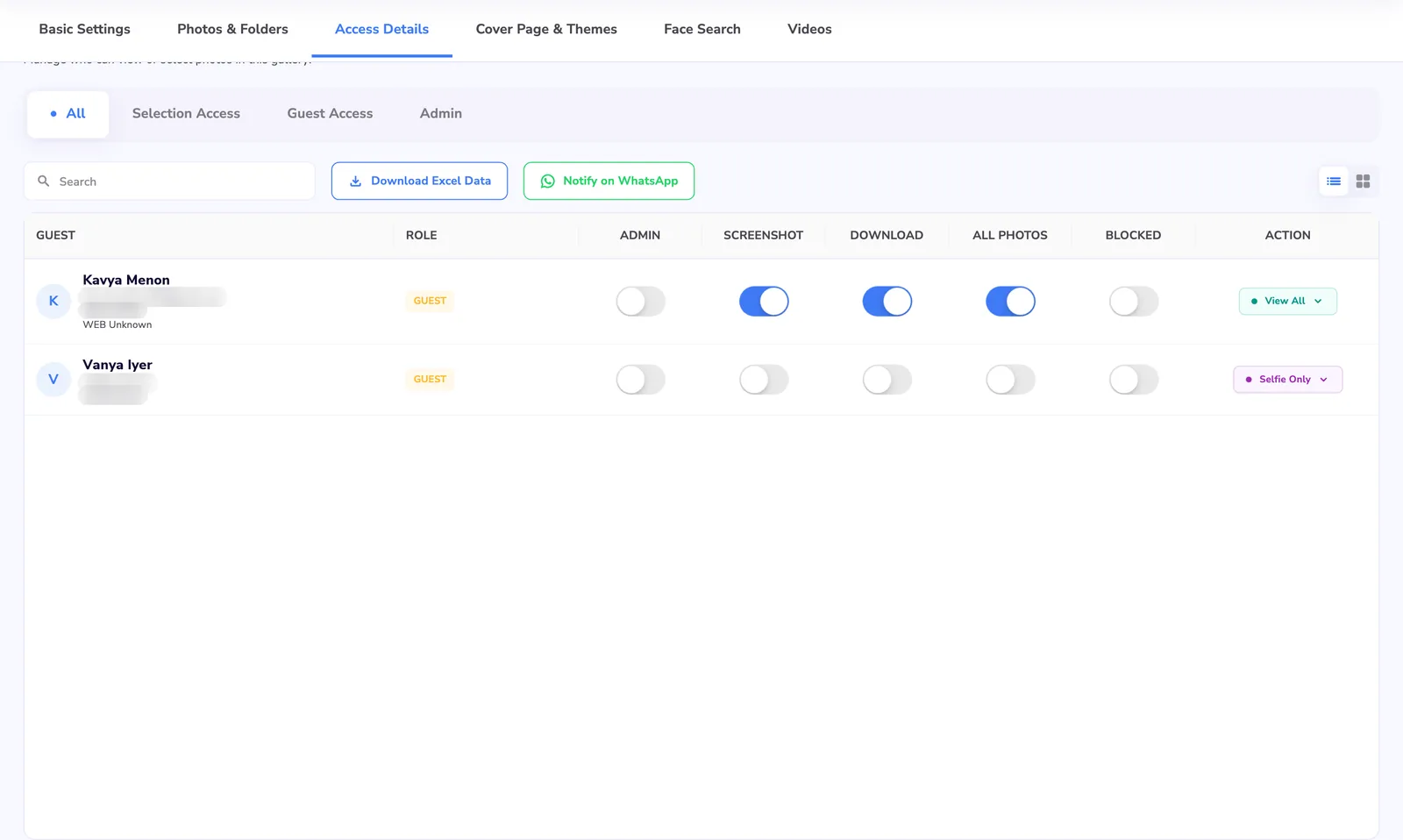
Not everyone should see the same thing. The couple and close family usually get the full gallery so they can select for the album. Everyone else gets selfie-only access. In Camtom's Access details tab you can see each guest who opened the gallery and set what they can do — view all or selfie only, download, take screenshots, or be blocked.
03Face search for you and your team
CatEye AI is not only for guests. Inside the gallery, the Face Search tab lets you upload a single photo and instantly find every photo of that person in the event. It is useful when the bride's mother asks for “all photos of Nani”, or when you are building a family page in the album.
04One QR at the venue
With the Face AI event QR code, you can place a QR on the welcome board or the photo booth. Guests scan it, take a selfie and get their photos. Combined with live uploads during the event, guests can see photos of themselves before the function ends — and they remember which studio made that happen.
Good to know: CatEye AI and the Face AI event QR are included in the Selection + Face AI plan (₹2,499 a year + GST); All Features (₹3,499 a year + GST) adds unlimited e-albums.
05Privacy: what to tell the family
Families sometimes worry about face recognition. Three points usually settle it:
- Photos stay in the photographer's own Google Drive.
- Guests see only photos they are in — not the bride's getting-ready shots or private family moments.
- The selfie is used only for matching and is then permanently deleted.
06Turn guest downloads into followers and income
When guests find their own photos, they want to download them. You can keep downloads free, switch them off, or make them paid at your price per photo. Strict Instagram follow mode asks guests to follow your studio's Instagram before they see their photos.
07Frequently asked questions
Can guests see only their own photos?
Yes. In guest mode each guest takes a selfie and sees only the photos where they appear.
Are guest selfies stored?
No. A selfie is processed only to detect and match the face, and is then automatically and permanently deleted.
Can the couple still see the full gallery?
Yes. You decide access per guest: full gallery, selfie only, download, screenshot or blocked.
Which plan includes face recognition?
CatEye AI face recognition is included in Selection + Face AI (₹2,499 a year) and All Features (₹3,499 a year), each + GST.